
CompTIA A+ Training
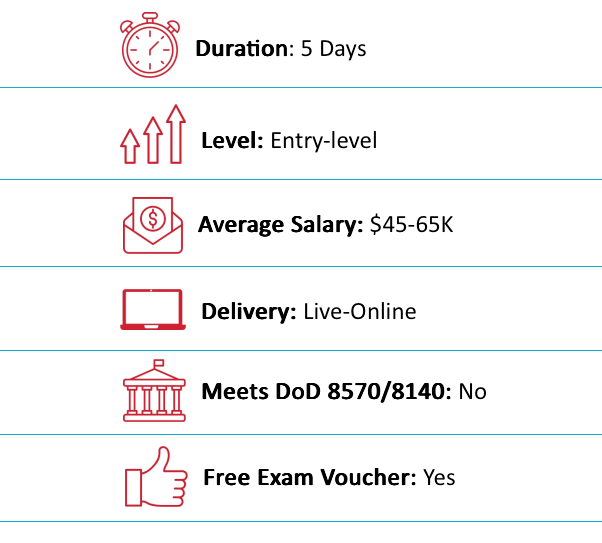
| | Duration: 5 Days or 10 Nights |
|Price: $2,995 |
| Delivery Method: Online Live/On-Demand Live
Price:
$2,995
Duration:
5 Days or 10 Nights
Delivery Method:
Online Live/On-Demand Live
Overview
Outline
Training Includes
Audience
About Exam
About the Instructor
Eric Reed Exclusives
CompTIA A+ Overview
CompTIA A+ certified professionals are proven problem solvers. They support today’s core technologies from security to networking to virtualization and more. CompTIA A+ is the industry standard for launching IT careers into today’s digital world.
CompTIA A+ is the only industry recognized credential with performance testing to prove pros can think on their feet to perform critical IT support tasks. It is trusted by employers around the world to identify the go-to person in end point management & technical support roles. CompTIA A+ appears in more tech support job listings than any other IT credential.
The CompTIA A+ Core Series requires candidates to pass two exams: Core 1 (220-1101) and Core 2 (220-1102) covering the following new content, emphasizing the technologies and skills IT pros need to support a hybrid workforce.
CompTIA A+ Outline
Module 1: Installing Motherboards and Connectors
- Explain Cable Types and Connectors
- Install and Configure Motherboards
- Explain Legacy Cable Types
Module 2: Installing System Devices
- Install and Configure Power Supplies and Cooling
- Select and Install Storage Devices
- Install and Configure System Memory
- Install and Configure CPUs
Module 3: Troubleshooting PC Hardware
- Apply Troubleshooting Methodology
- Configure BIOS/UEFI
- Troubleshoot Power and Disk Issues
- Troubleshoot System and Display Issues
Module 4: Comparing Local Networking Hardware
- Compare Network Types
- Compare Networking Hardware
- Explain Network Cable Types
- Compare Wireless Networking Types
Module 5: Configuring Network Addressing and Internet Connections
- Compare Internet Connection Types
- Use Basic TCP/IP Concepts
- Compare Protocols and Ports
- Compare Network Configuration Concepts
Module 6: Supporting Network Services
- Summarize Services Provided by Networked Hosts
- Compare Internet and Embedded Appliances
- Troubleshoot Networks
Module 7: Summarizing Virtualization and Cloud Concepts
- Summarize Client-Side Virtualization
- Summarize Cloud Concepts
Module 8: Supporting Mobile Devices
- Set Up Mobile Devices and Peripherals
- Configure Mobile Device Apps
- Install and Configure Laptop Hardware
- Troubleshoot Mobile Device Issues
Module 9: Supporting Print Devices
- Deploy Printer and Multifunction Devices
- Replace Print Device Consumables
- Troubleshoot Print Device Issues
Module 10: Configuring Windows
- Configure Windows User Settings
- Configure Windows System Settings
Module 11: Managing Windows
- Use Management Consoles
- Use Performance and Troubleshooting Tools
- Use Command-line Tools
Module 12: Identifying OS Types and Features
- Explain OS Types
- Compare Windows Editions
Module 13: Supporting Windows
- Perform OS Installations and Upgrades
- Install and Configure Applications
- Troubleshoot Windows OS Problems
Module 14: Managing Windows Networking
- Manage Windows Networking
- Troubleshoot Windows Networking
- Configure Windows Security Settings
- Manage Windows Shares
Module 15: Managing Linux and macOS
- Identify Features of Linux
- Identify Features of macOS
Module 16: Configuring SOHO Network Security
- Explain Attacks, Threats, and Vulnerabilities
- Compare Wireless Security Protocols
- Configure SOHO Router Security
- Summarize Security Measures
Module 17: Managing Security Settings
- Configure Workstation Security
- Configure Browser Security
- Troubleshoot Workstation Security Issues
Module 18: Supporting Mobile Software
- Configure Mobile OS Security
- Troubleshoot Mobile OS and App Software
- Troubleshoot Mobile OS and App Security
Module 19: Using Support and Scripting Tools
- Use Remote Access Technologies
- Implement Backup and Recovery
- Explain Data Handling Best Practices
- Identify Basics of Scripting
Module 20: Implementing Operational Procedures
- Implement Best Practice Documentation
- Use Proper Communication Techniques
- Use Common Safety and Environmental Procedures
CompTIA A+ Training Includes
- 25-Year Veteran Instructor with Over 60,000 Students Trained and the Best Pass Rates in the Industry
- “Pass on the First Attempt!” Guarantee
- Online Live Instructor-Led Training
- 1 Year Access to Training Session Recordings
- Enhanced Official CompTIA Courseware
- Official Virtual Lab Environment
- Fast-Track Exam Preparation
- Exam Vouchers
- After Class Support and Mentoring
CompTIA A+ Audience
- Help Desk Tech
- Field Service Technician
- Associate Network Engineer
- Junior Systems Administrator
- Desktop Support Specialist
- Help Desk Technician
- System Support Technician
About CompTIA A+ Exam
The CompTIA A+ certification is designed around a comprehensive set of exam objectives that outline the specific skills and knowledge areas to be tested. These objectives are divided into two exams, typically referred to as Core 1 (220-1201) and Core 2 (220-1202). Here’s an overview of the objectives for each:
Core 1 (220-1201) Exam Objectives:
- Mobile Devices: Installation and configuration of laptops and other mobile devices.
- Networking: Understanding various types of networks and connections, including TCP/IP, WIFI, and SOHO.
- Hardware: Identifying, using, and connecting hardware components and devices.
- Virtualization and Cloud Computing: Understanding the concepts of virtualization and cloud computing.
- Hardware and Network Troubleshooting: Troubleshooting hardware and network issues.
Core 2 (220-1202) Exam Objectives:
- Operating Systems: Installation and configuration of Windows, macOS, Linux, Chrome OS, Android, and iOS.
- Security: Identifying and protecting against security vulnerabilities for devices and their network connections.
- Software Troubleshooting: Troubleshooting PC and mobile device software.
- Operational Procedures: Best practices for safety, environmental impacts, and communication and professionalism in the workplace.
Additional Information:
- Exam Format: Multiple choice and performance-based questions.
- Duration: Each exam is 90 minutes long.
- Passing Score: 675 for Core 1 and 700 for Core 2 (on a scale of 100-900).
These objectives are periodically updated by CompTIA to ensure relevance with the evolving IT landscape. It’s advisable to refer to the latest version of the exam objectives from the official CompTIA website for the most current information.

About the CompTIA A+ Instructor
Eric Reed is a nationally recognized cybersecurity instructor and founder of Eric Reed Cybersecurity Training, with over 25 years of experience developing mission-ready IT and security professionals. A Master Certified EC-Council Instructor and 10-time Instructor of the Year—including the 2024 CEH Instructor of the Year from EC-Council—Eric has trained more than 60,000 students worldwide across certifications including CompTIA Security+, CySA+, PenTest+, CISSP, and CEH.
Renowned for his engaging teaching style and unmatched pass rates, Eric has delivered training for leading organizations across defense, government, healthcare, finance, and technology—including Boeing, Lockheed Martin, Verizon, the U.S. Department of Defense, and the Mayo Clinic. His programs emphasize real-world application, DoD 8140/NICE alignment, and first-attempt success, helping individuals and teams strengthen their defenses and advance their careers in cybersecurity.


DoD 8570/8140-Approved:
Career Roles You Can Access with CompTIA A+

 IAT Level I

Technical Support Specialist (411)
System Administrator (451)
Network Operations Specialist (441)
Cyber Defense Infrastructure Support (521)
Platform Specialist (441)
What Job Titles are Most Common for People with CompTIA’s A+ Certification?
Some common positions that this certification can help you land include:

IT Support
Specialist

Salary Range:
$32k – $81k

Linux Systems
Administrator
Salary Range:
$57k – $96k
(Junior/Associate level)

Cybersecurity
(SOC) Analyst
Salary Range:
$57k – $105k
(Tier 1 / Entry-Level)

Network
Administrator
Salary Range:
$52k – $83k
(Junior/Associate level)
What our Students say
Pedro Huesca Alvarado

Eric is proficient on all aspects in cybersecurity. I was a student of his program “Pass on the First Attempt” where he teaches key concepts and help you planning your way up from start to finish. Huge milestone achieved now I am CEH master! 100% recommend him!
Daniel Humbert
I had the privilege of being guided through the intricate world of Certified Ethical Hacking (CEH) by Eric Reed. If I were to sum up my experience in a few words, it would be “knowledgeable,” “approachable,” and “incredibly effective.”
Abdurrahim Gashi
What to say on Eric Reed, instructor highly motivated, experienced high level of scope of IT, and above all very friendly and very professional, every time when we have any clarification or assistance he has never hesitated to support us.
Tommy Grimes
Eric has proven to me personally he is a very highly skilled instructor and will go the extra mile to ensure your success. Anyone presently working toward, or considering, obtaining an EC-Council Certified Ethical Hacker Certification should definitely work with Eric. Eric will provide necessary guidance and support to get through an extensive and highly technical Curriculum, then study with purpose to pass both the CEH and CEH Practical exams, which are quite thorough tests and the certifications are not that easily attained. Working with Eric I was able to attain both the CEH and CEH Practical Certifications, attaining a CEH Master Designation. I am truly grateful for time Eric spent with me personally to ensure my success and expand my skillset in this area.
Ye Zeiya Shein
I highly recommend Eric as a cybersecurity teacher. His expertise in the subject matter, engaging teaching style, and dedication to his students’ success make them invaluable assets to any learning environment. His industry knowledge and practical experience are up-to-date, making him an excellent resource for those seeking to enter the cybersecurity field.
Jacob Hill
Eric is an AWESOME instructor! His teaching style is extremely engaging and his students benefit from his wealth of knowledge and experience. He taught my CEH class which I passed, and we also hired him to teach a private Security+ class for personnel who needed to comply with requirements in a recently awarded contract. Eric was awesome to work with and we had an excellent pass rate!
Winson Chansa
Extremely professional and motivating, that is what comes to mind if I describe Eric Reed. He is a skilled cyber security instructor and mentor. Eric and I met when I was preparing to write my Certified Ethical Hacker (CEH) exam. I was still procrastinating and struggling to find a balance between work and studying. That was a small problem for him. With his years of experience in the industry and vast skills as a trainer, he helped guide me to certification. When exam time came, I passed with flying colors. Eric is the best at what he does… Helping numerous cybersecurity professionals achieve their certifications. It is a pleasure to be mentored by him. Thank you, Eric!
Andrew Katota
Ever since I was in University, I’ve wanted to be a Certified Ethical Hacker. Who knew that this would only happen this year. Thanks to Mr. Eric Reed’s on-point exam prep material, I am now a CEH Master with an average score of 88% from both exams. I, therefore recommend Mr. Eric Reed as the go-to for all your EC-Council Certification needs; CEH(ANSI), CEH(Practical), CHFI, CND, and many more. Thanks again, Mr. Reed. On to the next Certification.
Aldo Amoroso
I just completed the CEH online training and successfully passed the exam! Eric’s delivery of the online training was very good, each module has a lecture (15~60 minutes) followed by very realistic hands on labs. In terms of level of effort 1 to 4 HRS/Module depending on your past experience etc. What really impressed me – as I was getting close to writing the exam, I reached out to Eric for some assistance. Eric, coached me on what area’s to focus on & was a great asset for my examination preparation – TY Eric!
Duane Parker
Eric Reed is an superb instructor. I have taken five EC council classes with him over the past several years. He is on point and very motivated to make sure the student is picking up the subject at hand. Eric’s ability to instruct cybersecurity is amazing and he takes passion in his instruction and working with every student to make sure they are successful. I recommend Eric Reed 100%. As I continue further education and cyber security he will be my instructor of choice. Thanks for your guidance, motivation and being available for those crazy questions.
Collin Vandersommen
I took the Certified Ethical Hacker course through Applied Technology Academy this past week and Eric was my instructor. He kept us actively engaged and did a fantastic job presenting the material in a way that was easy to understand. He focused heavily on the exam objectives to ensure that we were prepared and had all the tools necessary to succeed. I hope to be able to take his ECSA or CISSP in the near future!
James York
I have taken three courses with Eric: CEH-Certified Ethical Hacker, ECSA-EC-Council Certified Security Analyst, and now preparing for CISSP-Certified Informational Security Professional. In all three courses, he has helped me pass each one and confidence to pass the last exam. Eric provides the keys to succeed not only for preparing for the exams but also provides the correct blend of methodology and practical application. All you need to do is be there and put forth the effort and it can happen. Even after the class is completed he is there to help. If you are looking learn and put in the time Eric will help you succeed.
Jason W. Sharp
I had the great pleasure of attending a virtual EC-Council Incident Handler boot camp instructed by Eric after spending several weeks with a 1000+ page book and sitting the exam (failing twice).
I was fortunate enough to see an unrelated post Eric posted on Linked In and reached out to contact him. He quickly accepted the invite and offered immediately to connect via phone to listen to the problem and offered timely, accurate advice on the material and talked about the instructional system design process used to develop exams (agnostic of any exam).
This added time taken to assist a learner in need paid HUGE dividends as I finally cleared the hurdle that was ECIH.
Michel Pierre
Great instructor, highly recommended!

The Best CompTIA A+ Training With Eric Reed Cybersecurity Training
“Pass on the First Attempt!” – Our top priority is to equip our students with both the certification and practical knowledge necessary to excel in their field. Through our optimized delivery format, which includes live instruction, hands-on labs, and rigorous exam preparation, we are able to produce unparalleled success rates. Our methodology has been proven to prepare students for real-world scenarios, ensuring that they are able to apply their skills with confidence.
Take your career to the next level with our instructor led, live online and onsite training!
CompTIA A+ Training. Exam Preparation and Training
Our training programs utilize concise, specially designed slides to facilitate a deeper understanding of complex security concepts. These slides are created by our expert developers and are aimed at providing an optimal learning experience. The course, led by Eric Reed – a Master Certified CompTIA Instructor and 9-time recipient of EC- Council’s Instructor of the Year award, spans a 5-day (or 10-evening) period and is designed to be highly interactive, featuring practical exercises to ensure that students acquire the necessary skills to succeed in the industry.
